
Below is a list of item types and their freight class overrides we would like for you to enter when creating freight shipments in Logicbroker. The “Freight Class Override” field is found under each item within the “Shipment Items” area of a new shipment.
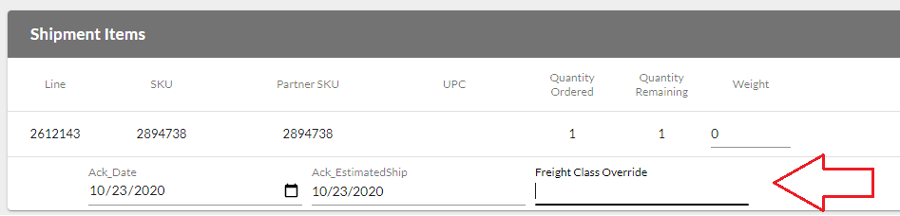
You would enter this before hitting the “Submit” button. Please use the following guidelines:
- If pallet has none of these item types listed below, leave the freight class override field blank
- If pallet has one of these item types, enter the class code from list below in that item’s override field
- If pallet has more than one of these item types, use the following logic:
-
- If pallet has a refrigerator, always use its class code (150) regardless of the other items
- If no refrigerator, but does have an ice maker, always use its class code (92.5) regardless of the other items
- If no refrigerator or ice maker, but does have a gas grill, always use its class code (92.5) regardless of the other items
- If no refrigerator, ice maker or gas grill, enter the smallest class code of the applicable item types
-
- Ex: If pallet contains a charcoal grill (110) and a wall mount gas heater (150), you will enter 110 in the charcoal grills override field
-
-
- Metal Cabinets refers to Outdoor Kitchen Storage Drawers, Combos, Trash Bins, etc.
| Description | Qualifier | Class Code |
| Refrigerator | 150 | |
| Ice Maker | 92.5 | |
| Gas Grill | 92.5 | |
| Charcoal Grill | 110 | |
| Metal Cabinets | < 165 lbs | 250 |
| Metal Cabinets | > 165 lbs | 150 |
| Fire Pit | 92.5 | |
| Vent Hood | < 300 lbs | 250 |
| Vent Hood | > 300 lbs | 150 |
| Gas Logs | 92.5 | |
| Kamado Grill | < 450 lbs | 150 |
| Kamado Grill | > 450 lbs | 77.5 |
| Gas Heater | Wall/Ceiling Mount | 150 |
| Patio Furniture | 250 |