
In order to activate your TikTok connection, you must be an active Logicbroker customer.
About this app
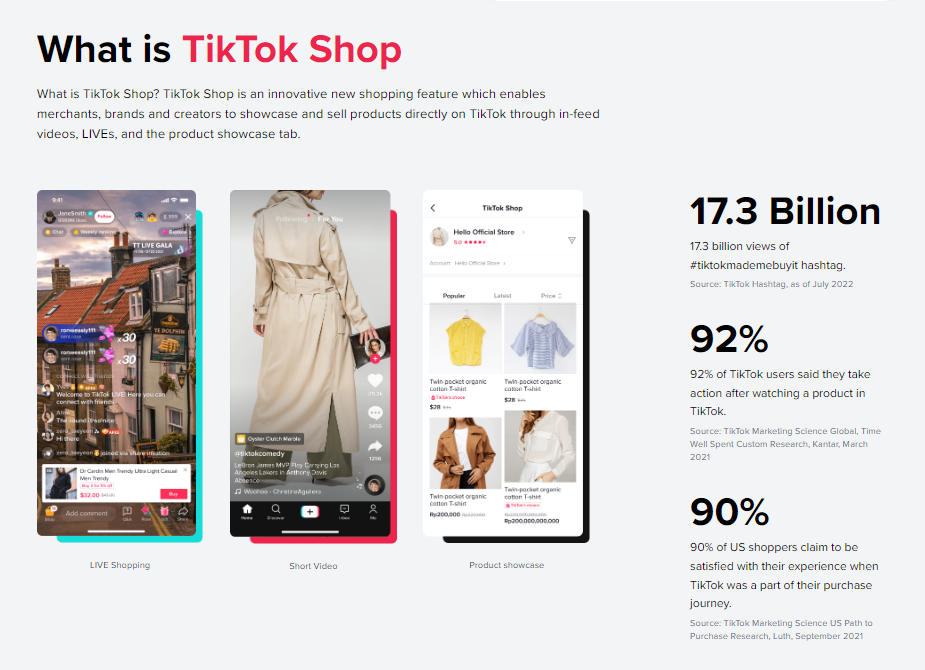
TikTok Shop an extension to TikTok (a social media video-sharing application). This innovative new shopping feature enables merchants, brands and creators to showcase and sell products directly on TikTok through in-feed videos, LIVEs, and the product showcase tab. Logicbroker’s connection to TikTok provides sellers with an easy way to manage and route orders into their own system. Grow your business with TikTok Shop today! TikTok Shop Seller Sign Up
Features
- Receives Inventory
- Provides Orders
- Provides and Receives Acknowledgments
- Receives Shipments
- Provides and Receives Returns
Website: https://seller-us-accounts.tiktok.com/account/register
TikTok Shop Academy: https://seller-my.tiktok.com/university/essay?knowledge_id=10000852&identity=1&from_article=1
TikTok Shop Support: https://seller-us.tiktok.com/contact-us
Quantities can only be updated for products in a live (code: 4) status.
Warehouse Code
A warehouse code is optional if the SKU is in a default warehouse - if the SKU is not in a default warehouse or is set up across multiple warehouses, then the warehouse code will be required.
Orders are sent from TikTok to Logicbroker through the API. Logicbroker will then transforms the order data into a format the seller can easily understand . In addition to transforming data, Logicbroker can also add data to orders, match retailer SKUs to suppliers' SKUs and more. Once we have transformed the data, it is made available in our portal or we can send it to you through your preferred integration method (EDI, CSV, JSON, XML, Shopify, ShipStation, etc.). Orders are pulled into Logicbroker every 15 minutes following a 1-hour remorse period. These feeds only include quantities that were changed within the last hour - it will not send a full feed each time.
Status
Logicbroker only pulls orders in an Awaiting Shipment status (code: 111)
Remorse period
Logicbroker has a 1-hour remorse period enabled to allow customers to cancel their orders - sellers need to be sure not to manually change the status on orders during this time or we will not be able to pull them in
Customer-Initated Cancellations
Flow: TikTok > Logicbroker > Seller
Customer-initated cancellations are pulled into Logicbroker as a Cancellation Acknowledgment. The order will move to a Cancelled status if all order items are cancelled. Partial cancellations are supported if they are initiated by the customer. Customer cancellations are pulled into Logicbroker every hour at 40 minutes past the hour.
Change reason
For customer-cancelled orders, the Change Reason on the acknowledgment will be Order cancelled by system
Seller-Initiated Cancellations
Flow: Seller > Logicbroker > TikTok
Seller-initated cancellations are created in the portal or sent into Logicbroker by the seller. Logicbroker will transform the data and send it into TikTok. When Logicbroker posts cancellations, we will check first to see if there is an existing customer-initated cancellation - we will then either accept the cancellation request or issue a new one. The order will move to a Cancelled status if all order items are cancelled. Partial cancellations are not supported if initiated by the seller. If a seller cancels an order directly in TikTok, we will not pull in that cancellation since we only pull in customer-initiated cancellations.
Order status requirement
Orders can be cancelled by customers or by the seller before it reaches a To Ship - Awaiting Collection status in TikTok. Sellers can cancel orders before the order status is in a Shipped status in TikTok. Cancellations are no longer accepted once the order is in a Ready to Ship status in Logicbroker.
Order status to pull cancellation
Orders must be in a Cancel status (code: 1) in TikTok to be pulled into Logicbroker. Once pulled in, Logicbroker will update the order to a Cancelled status.
- Ship by TikTok - TikTok Shop fulfills orders
- Flow: TikTok > TikTok
- Flow: TikTok > TikTok
- Ship by Seller - sellers choose their own logistics service to fulfill orders
- Flow: Seller > Logicbroker > TikTok
Multiple tracking numbers
Logicbroker pulls returns in a TikTok reverse type: 3.
| Required | Logicbroker Field | TikTok Field |
|---|---|---|
| ✓ | Merchant SKU |
Seller SKU ⚠️ The SKU in TikTok must be in a live status |
| Quantity | Quantity | |
| Price |
Cost ⚠️ See here for cost format requirements and limits based on region |
|
| Warehouse |
Warehouse Code ⚠️ A warehouse code is optional if the SKU is in a default warehouse - if the SKU is not in a default warehouse or is set up across multiple warehouses, then the warehouse code will be required |
| Logicbroker API Field | TikTok Field |
|---|---|
| PartnerPO | order_id |
| SubTotal | sub_total |
| Currency | currency |
| Discounts | |
| DiscountAmount | seller_discount |
| DiscountName | SellerDiscount |
| Taxes | |
| TaxAmount | taxes |
| Shipment Info | |
| ShipmentCost | shipping_fee |
| FirstName | name |
| Address1 | full_address |
| City | city |
| State | state |
| Zip | zipcode |
| Phone | phone |
| Order Line | |
| RetailPrice | original_price |
| Price | sale_price |
| Description | product_name |
| Quantity | quantity |
| SupplierSKU | seller_sku |
| TikTokProductId | product_id |
| TikTokSkuId | sku_id |
| TikTokOrderLineId | order_line_id |
| Other | |
| TikTokDistrict | district |
| TikTokTown | town |
| TikTokCreatedTimestamp | create_time |
| TikTokPackageId_ | package_id |
| Method | payment_method |
| Logicbroker API Field | TikTok Field |
|---|---|
| PartnerPO | order_id |
| ReturnNumber | reverse_order_id |
| TikTokRequestTimestamp | reverse_request_time |
| TikTokReturnTrackingId | return_tracking_id |
| SupplierSKU | seller_sku |
| Quantity | return_quantity |
| ReturnReason | return_reason |
| TikTokProductId | product_id |
| TikTokSkuId | sku_id |
| Logicbroker Field | TikTok Field |
|---|---|
| TikTokPackageId_ |
package_id |
| TrackingNumber | tracking_id |
| ReceiverClassCode |
provider_id
|
- Logicbroker account (supplier flow) - become a Logicbroker customer
- TikTok Shop account - TikTok Shop Seller Sign Up
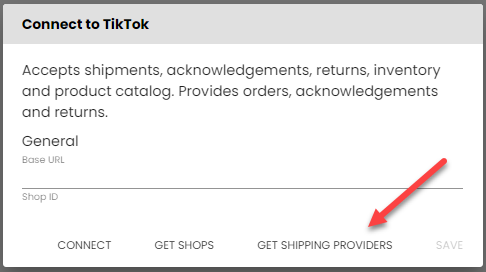
- From the Logicbroker portal, go to Connections > Connect to a new system > search for TikTok
- Under General, enter in the Base URL (production or sandbox depending on how you are testing through TikTok)
- If your shop is in the United States, set Is US? to true
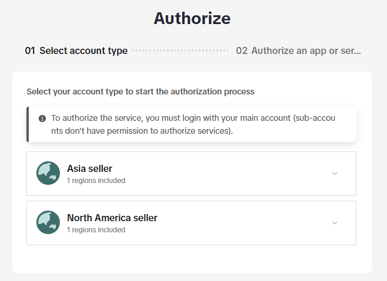
- Click on Connect - you will be prompted to choose your region, log in using your TikTok credentials, and install the app.
.png?width=243&height=310&name=mceclip1%20(1).png)
- Once connected, click on Get Shops
- Copy the Shop Cipher you wish to connect to into the Shop Cipher field
- Save
| Issue | How to troubleshoot or resolve |
|---|---|
| Nothing here yet! |
|
FAQ’s
Nothing here yet!
Also see TikTok Shop's Support page and TikTok Shop's Academy.
| Date | Update |
|---|---|
| Nothing here yet! |