
In order to activate your Squarespace connection, you may need to be an active Logicbroker customer.
About this app
Squarespace is an all-in-one website building and hosting platform designed for users of all skill levels. It offers a range of customizable templates, intuitive drag-and-drop design tools, and integrated features like e-commerce, blogging, and analytics. Squarespace aims to empower individuals and businesses to create professional, aesthetically pleasing websites without needing extensive technical knowledge. Logicbroker’s connection to Squarespace provides suppliers with an easy way to manage orders directly in Squarespace with a direct connection to suppliers’ trading partners. Get started today with a subscription or try it for free! Squarespace Pricing
Supplier Features
- Receive Orders
- Send Inventory
- Send Products
- Send Cancellations
- Send Shipments
Website: https://www.squarespace.com/
Squarespace Support: https://support.squarespace.com/hc/en-us
- Logicbroker account (supplier flow) - become a Logicbroker customer (depending on your partner, you may not need to become a customer)
- Squarespace account - review pricing, or try it for free!
To connect your Squarespace account with Logicbroker,
- From the Logicbroker Production portal, go to the Connections page
- Click on Squarespace
- Click on Connect
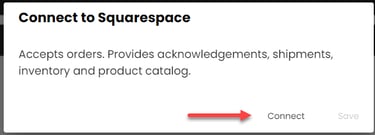
- You will be prompted to log into your Squarespace account and authorize permission to Logicbroker
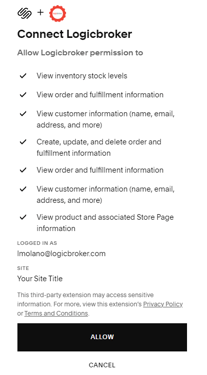
- Connection successul! If you run into any issues connecting, reach out to
support@logicbroker.com
| Issue | How to troubleshoot or resolve |
|---|---|
| Nothing here yet! |
FAQ’s
Nothing here yet!
Also see Squarespace's Help page.
| Date | Update |
|---|---|
| 5/17/24 |
Squarespace available for suppliers to pull in orders and send inventory, products, acknowledgments and shipments. |