
Logicbroker
Intelligent Commerce Network
- Require completed onboarding before go-live: Retailers can turn on a new ODO setting that stops suppliers from requesting go-live until every required onboarding step is done, including test cases. The Request Go Live button turns back on as soon as the last step is complete. The setting is off by default, so current behavior doesn’t change unless you choose it.
- Approve supplier shipping labels during onboarding: Retailers can add an optional ODO step where suppliers upload the shipping label they plan to use. Retailers approve or reject it in ODO. A rejection notifies the supplier, and every upload and decision is recorded in Events.
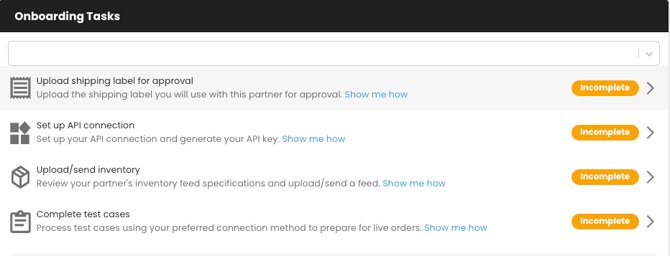
- Correct onboarding answers without restarting the form: Retailer users can now edit a supplier’s submitted custom question answers directly. Before, they had to reject the form and ask for a resubmission. Each change is logged in Events with the user and date.
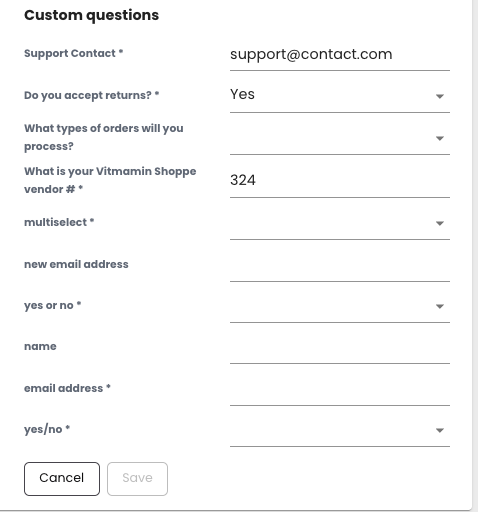
- Ask more onboarding questions: ODO onboarding forms now allow up to 15 custom questions, up from 10. The new answers appear in the table and in the export.
- Identify vendors who need repeated follow-up: The ODO Supplier Engagement Report has a new Retry Count column. It shows how many times a supplier’s onboarding has been restarted, so chronically unresponsive vendors are easy to spot and escalate. The column is in both the table and the export.
- Record cancellations and returns more precisely: The standard reason code list adds 7 cancellation reasons and 7 return reasons, such as Customer Refused Delivery, Order Entry Error, Lost in Transit and Gift Return. “Cannot ship to PO Box” is now “Cannot ship to delivery location.” Suppliers still get one consistent list across all retailers.
- Export only the failed documents you’re viewing: The Failed Documents export now applies your active filters, so a report for one supplier contains only that supplier’s documents. When filters are on, the button reads “Export Filtered View.”
- See shipping speed in days: Average Time to Ship now shows both hours and days, for example “171 hours (7.12 days),” on Scorecards, PMC and Discover. Exports include a new Average Days to Ship column.
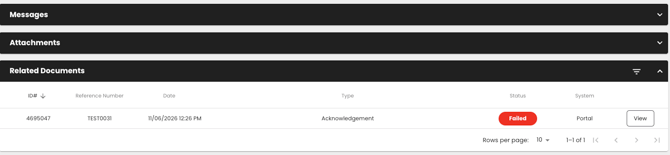
- Match documents to the items ordered: The Related Documents view now shows a Reference Number column. When several items share one Order ID, you can tell which document belongs to which item.
Bug Fixes:
- Reports Agent returns consistent order volume: Order volume questions no longer sometimes return 0 while data is refreshing.
- Reports Agent answers SKU and order-line questions for every client: Clients without catalog matches were getting “no data” on order-line questions. They now get complete answers.
Connectors
- Find Wayfair orders by the number customers see: The Wayfair connector now captures the Wayfair Order Number as a KVP alongside the PO Number. Support teams can look up orders using the number on a customer’s receipt. The existing PO Number field is unchanged.
- Search Shopify orders by retailer PO: The Shopify connector now fills in poNumber, so the retailer’s PO number can be searched in Shopify admin. This applies when “Use Partner PO as Shopify Order ID” is turned off.
- Send correct pricing to TikTok: The TikTok connector now sends List Price and Retail Price as separate fields, instead of sending Cost as the only price. TikTok listings show the intended prices.
Bug Fixes:
- Wayfair orders with no estimated ship date now import: CastleGate POs with an empty estimated ship date no longer stop the whole order batch
- Santander returns now complete: Return acceptance and completion now go to the correct Santander endpoint, so they no longer fail with 404 errors.
Virtualstock
Stock & Orders
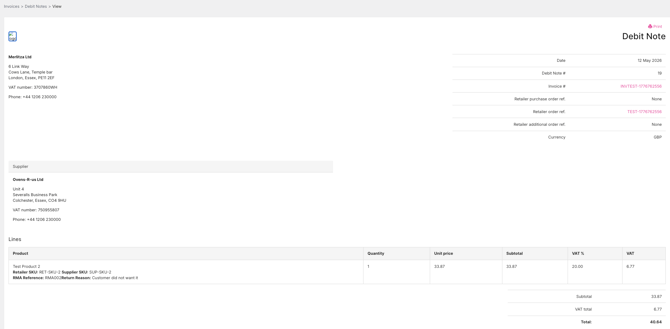
- Manage debit notes in one place: Find any debit note from a dedicated list and open its full detail, with no workarounds. Debit note requests have matching list and detail pages, so you can track them from request to completion.
- Find orders by invoice status: Filter the order list by invoice status to quickly spot orders that still need invoicing or attention.
- Report on suppliers without extra lookups: The Common Fields report now includes supplier name, so you no longer need to match supplier IDs by hand.
- Faster, more reliable order list: Limiting how many suppliers you can select in the order list filter keeps the page responsive.
- More stable product API: A maximum page size on the v4 product list endpoint keeps responses consistent and dependable for every integration.
- Cleaner tracking data: Tracking numbers longer than 100 characters are now rejected at dispatch, so invalid data doesn’t reach your customers.
Bug Fixes:
-
Accurate invoice status: Invoices delivered over SFTP now show as sent automatically, so you don’t chase invoices that have already arrived.
- Import orders and products without failed uploads: Imports now handle Excel files without a readable worksheet and header rows that contain dates, so less time goes on fixing and resubmitting files.
- Search debit notes without errors: Debit note search now handles any filter combination
- Get order reports faster: The new orders report runs faster for high-volume retailers.
- See your dashboard for every supplier: The dashboard now opens for offline suppliers, and order dials load even when you watch a large number of suppliers.
Product Induct
Bug Fixes:
- Get product exports out on time: Exports stuck for more than 30 minutes now fail automatically so you can rerun them, and large exports complete more reliably.
- Keep product updates moving: Stalled bulk actions such as “Clear Errors and Re-validate” no longer block your exports.