
Please note - Invoices and payments referenced here is for Dropship PO(s) ONLY
Submit Your Invoice
- The supplier must provide a unique invoice number for each purchase order at the time of ship confirmation.
- Walgreens will create an invoice on the supplier's behalf utilizing:
- unique invoice number provided by the supplier at ship confirmation
- item and units provided by the supplier at ship confirmation
- approved cost of goods as provided by the supplier in Stibo (See Cost Update section of the support site for more details)
NOTE: Walgreens will submit the invoice into ePro (iSupplier) on behalf of the supplier for invoice processing. This process is automatic and prompted by the vendor’s shipping confirmation in Logicbroker.
- All approved invoices in iSupplier will be sent to Vendor Accounting Information Systems (VAIS 3S)
How to Check Your Invoice and Payment Status
Always starts with checking Vendor Accounting Information Systems (VAIS 3S) through https://suppliernet.walgreens.com/Login.jsp# (other names: SupplierNet, 3S, Retail portal).
Sample view below
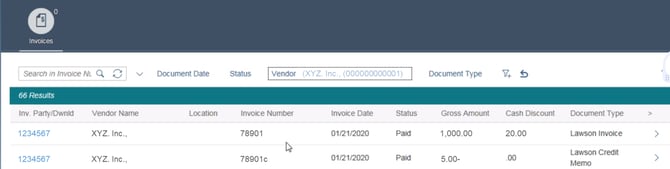
- See detailed instructions here
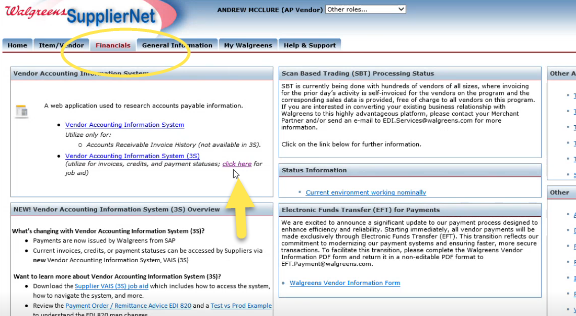
2. Any questions on your outstanding invoice in VAIS 3S?
- Reach out to Ap-helpdesk@walgreens.com. Include the invoice in question and clarify that you are a digital Drop-ship vendor
- Invoice information is available on LogicBroker as well as Purchase Order information. Walgreens PO number starts with ‘3000’.
Troubleshoot Unpaid Past-Due Invoice
| Reasons for invoices not processed | Action |
| You haven’t submitted your invoice | Submit your invoice through shipping confirmation in Logicbroker and check back |
| Your invoice payment is not due yet | No action, wait until due date and check again |
| Past due but not processed |
Contact Ap-helpdesk@walgreens.com MUST INCLUDE: invoice in question and clarify that you are a digital retail Drop-ship vendor |
| Do not see your invoice in iSupplier/ePro, but submitted shipping confirmation in Logicbroker |
Contact Ap-helpdesk@walgreens.com MUST INCLUDE: invoice in question and clarify that you are a digital retail Drop-ship vendor |