
Troubleshooting Failed Shipments
There are a few reasons shipments may fail. Two of the most common reasons are :
1. Incorrect Shipping Method
2. Missing Invoice Number
To Find Failed Shipments :
1. From the Dashboard, you will see Other Non-Compliant Documents in the top right. This is where you will find all the failed shipments along with any other failed documents
2. Hit View on the shipment you wish to fix
3. Understand the error message before taking any action :
1. Incorrect Shipping Method :
1. Once you have the shipment open, select the error message next to Most recent events
2. Incorrect shipping methods will come in as Validation Failed with additional details as below :
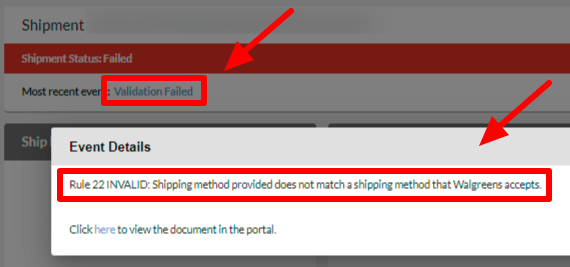
3. This means that shipping method indicated on the shipment is not one that is supported by Walgreens
4. You will see what the ship method on the document is under the Box information :
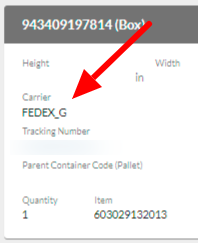
5. In this example, FEDEX_G is not supported by Walgreens and needs to be changed to a code that is supported
6. To view what ship methods are supported by Walgreens, navigate to Settings > Shipment Options and under Ship Method Mappings, select Used by Partner. This will pull up all the shipping methods that Walgreens accepts. If the method is not checked, then it cannot be used on the shipment :
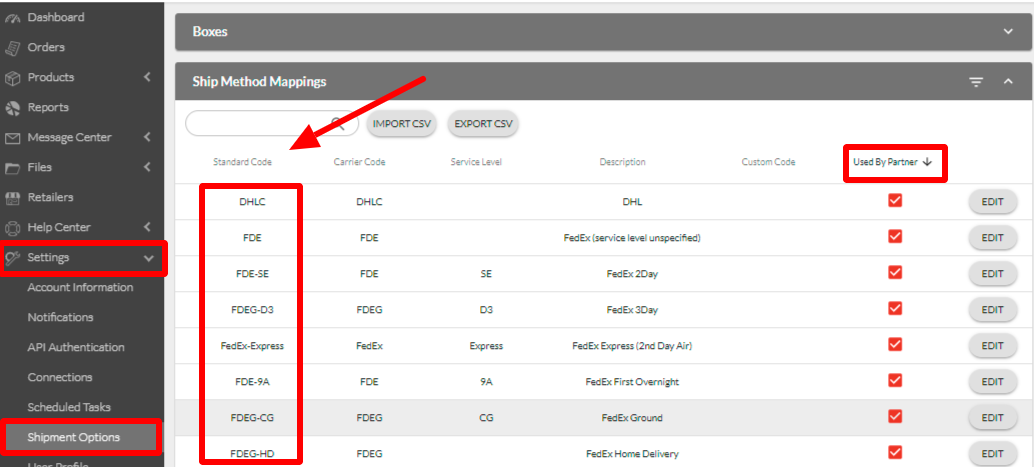
7. When you have found the shipping method you would like to use, by sure to copy the Standard Code and not the Carrier Code or the Description
8. Go back to the shipment and in the top right, select More Actions > Edit > Yes
9. This will put the shipment back in a draft status
10. Enter the new shipping code in the Carrier field :
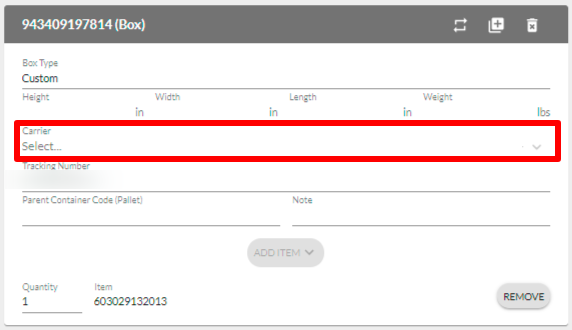
11. In the top right, click Submit
2. Missing Invoice Number :
1. Once you have the shipment open, select the error message next to Most recent events
2. Missing invoice number will come in as Validation Failed with additional details as below :
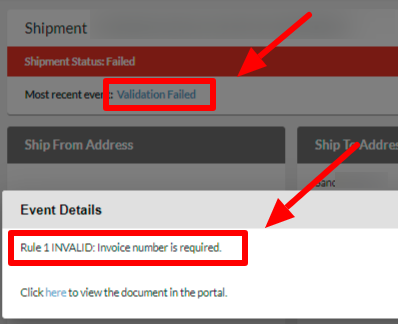
3. This means that the invoice number is missing from the shipment document and will need to be added and the shipment needs to be reprocessed.
4. On the shipment, on the top right, select More Actions > Edit > Yes
5. This will put the shipment back in a draft status
6. Enter the invoice number in the Invoice Number field :

7. In the top right, click Submit