
Sometimes it happens that you don’t have the tracking number for a shipment, however the items are shipped and should be invoiced. This page will outline some potential scenarios when it can happen and how to process such orders in Logicbroker.
Here are some of the most common scenarios when you won’t have a tracking number:
- Your supplier confirmed shipping but didn’t provide any tracking information to you.
- A small local carrier was used, which doesn’t provide detailed tracking information.
- A carrier is not listed in the drop-down menu on the Shipment page in Logicbroker
How to proceed:
For Portal Users:
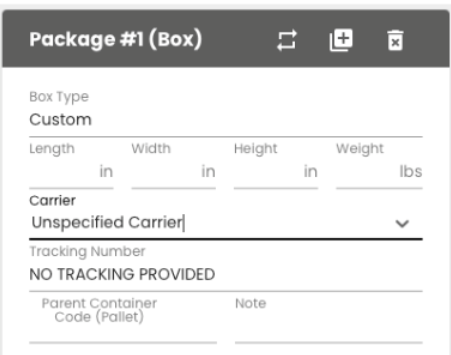
You should still create a shipment entering all details:
- Under Carrier you should select ‘Unspecified Carrier’
- Under the Tracking Number you should enter ‘NO TRACKING PROVIDED’
- Add the Ship From Address, Estimated Delivery Date
- Verify the items on the package and submit the shipment in the right upper corner
For Integrated Suppliers:
Below are sample specs we’d like to receive in your ship docs in these cases.
(1) cXML
<ShipControl>
<CarrierIdentifier domain="SCAC">UNSP</CarrierIdentifier>
<ShipmentIdentifier>NO TRACKING PROVIDED</ShipmentIdentifier>
</ShipControl>
(2) EDI
TD5*B*2*111101*T*U11 UNSP
REF*CN*NO TRACKING PROVIDED
(3) JSON
"ShipmentInfos": [
{
"DateShipped": "2023-05-18T00:00:00",
"CarrierCode": "UNSP",
"ClassCode": "UNSP",
"TrackingNumber": "NO TRACKING PROVIDED",
"Qty": 15,
"ContainerType": "box"
}
],
Following this process will save time for both you and us. It will also allow the customer to receive the information about their orders as soon as possible. If this process is not followed, we’ll reach out to you in order to obtain more details and fix it.