
In order to activate your Shopify connection, you must be an active Logicbroker customer.
About this app
Shopify is an eCommerce platform for online stores and retail point-of-sale systems that allows merchants to build and customize their own online stores and sell in multiple places. Logicbroker’s connection to Shopify provides suppliers with an easy way to manage orders directly in Shopify with a direct connection to suppliers’ trading partners. Get started today with a subscription or try it for free! Shopify Pricing
Supplier Features
- Send Inventory
- Send Products
- Receive Orders
- Send Shipments
Retailer Features
- Receive Inventory
- Receive Products
- Send Orders
- Receive Shipments
- Receive Acknowledgments
Website: https://www.shopify.com/
Shopify Support: https://help.shopify.com/en
- are tagged with 'Logicbroker' (not case sensitive)
- are in an 'Active' status
- have a SKU (products with no SKUs will be ignored)
- Sales Channel: 'Online Store' enabled
- Tag: 'From Logicbroker'
- Delist: When delisting a product in Logicbroker, it will completely remove the product or variant from Shopify
- Suppliers: cannot have duplicate SKUs in their Shopify system - if duplicate SKUs are present, only the most recent product pulled into Logicbroker will be used when souring and creating orders
- Retailers: will require a matching file if there are duplicate SKUs accross multiple suppliers
- If 'Track Quantity' is disabled, we will pull quantity of 1000
- If 'Track Quantity' is enabled, we will pull the 'Available' quanitity from Shopify
- If 'Coninue selling when out of stock' is enabled, we will pull the 'Available' quantity from Shopify
- If any product has a negative quantity, we will pull in 0
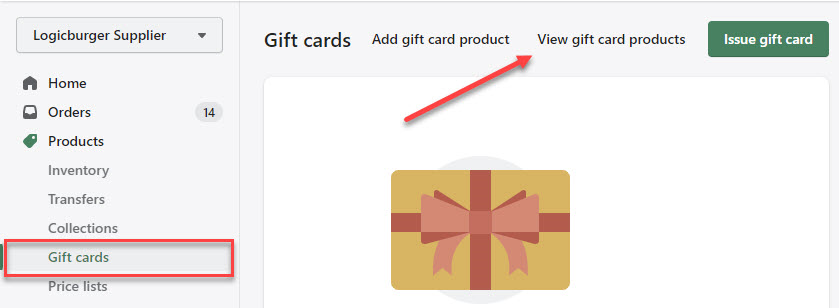
- In the Shopify portal navigate to Products > Gift cards > View gift card products
- Select the one you want to add a SKU to
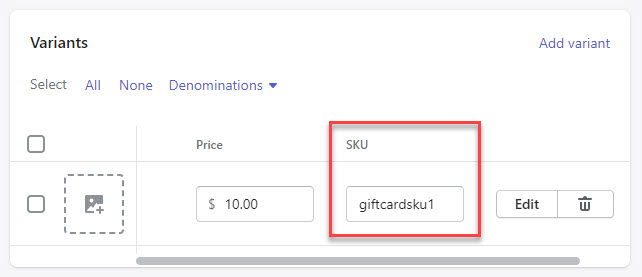
- Scroll down to Variants
- Add a SKU
Location
For suppliers, the Location setting in the portal controls where we pull inventory from. By default, we will pull inventory from all Shopify Locations unless a specific Location is specified.
Orders sent to suppliers
- 1 Store Location - all orders will be routed to that one store
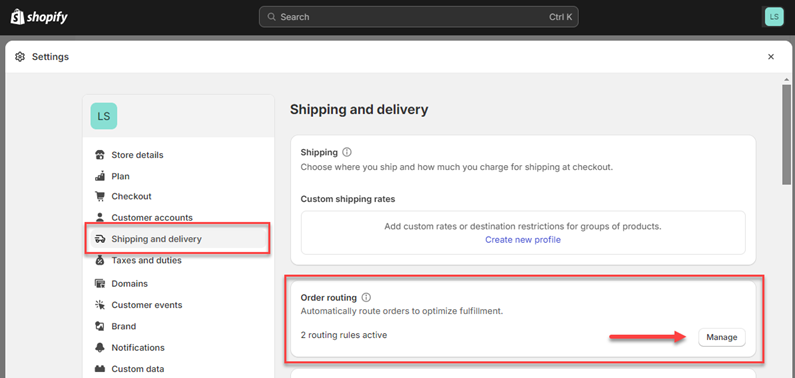
- Multiple Store Locations - orders will be sent to the location depending on the order rules configured in Shopify (in Shopify, see Settings > Shipping and delivery > Order routing)
- PO Box - Carrier dependant
- International Addresses - May require customs information if the label is created in Shopify
Partial Cancellations (Retailer Flow)
Suppliers can partially cancel orders through the portal. Logicbroker will post cancellations to the retailer's Shopify account. See order and fulfillment statuses depending on the scenarios below:
- Orders with free shipping fully canceled using multiple cancellations will show:
-
Fulfillment status: Unfulfilled
-
Payment status: Refunded
-
-
Orders with paid shipping (order or line level) fully canceled using multiple cancellations will show:
-
Fulfillment status: Unfulfilled
-
Payment status: Partially Refunded (we are not refunding shipping)
-
-
Orders with free shipping fully canceled using one cancellation will show:
-
Fulfillment status: Unfulfilled
-
Payment status: Partially Refunded
-
Order status: Canceled
-
Note : Logicbroker does not fully refund or calculate refunds for shipping costs. The restock type we post back to Shopify is no_restock so there is no interference with inventory levels.
- Shipments: shipping label is created in Shopify
- Fulfillments: tracking is manually input into Shopify
Multi-box shipments
| Required | Logicbroker Field | Shopify Field |
|---|---|---|
| ✓ | Supplier SKU | Variant SKU |
| UPC | Variant Barcode | |
|
⚠️ Note Logicbroker will populate the UPC using Shopify's Variant ID on the order if the Partner SKU is not matching up with the Supplier SKU. |
||
| Quantity | Variant Inventory Quantity | |
| RetailPrice | Variant Price | |
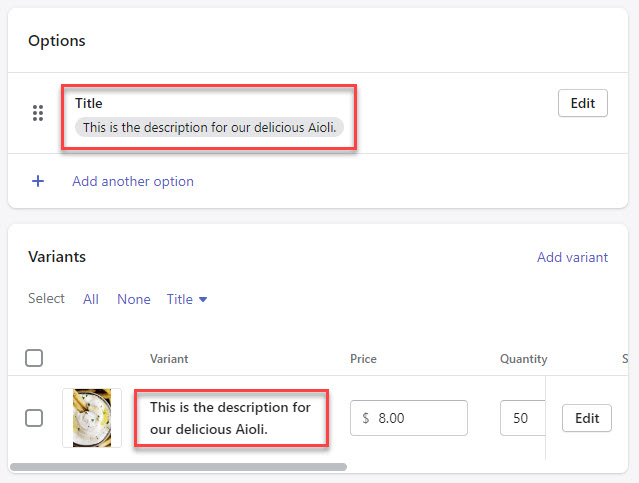
| SupplierDescription | Variant Title | |
|
⚠️ Note Logicbroker maps SupplierDescription to Shopify's Variant Title , not the item Handle . If no Variant Title is present, Logicbroker will default the description on orders to ' Default Title.' |
 |
|
| Field | Pulled from Shopify | Sent to Shopify | Notes |
|---|---|---|---|
|
Name In Shopify:" 'Title' |
✓ |
✓ |
|
|
Variant Name In Shopify: 'Options' |
✓ |
✓ |
For products with no variants: this will show as 'Default Title' For products with variants: this will show as option values (ex. Gray / Small). |
| Description | ✓ | ✓ | |
|
Images In Shopify: 'Media' |
✓ | ✓ |
Variant images will show in 'Image 1' with main product images starting at 'Image 2' |
|
SKU |
✓ | ✓ | |
| Barcode | ✓ | ✓ | |
| Price | ✓ | ✓ | |
| Compare At Price | ✓ | ✓ | |
|
Taxable In Shopify: 'Charge tax on this product' |
✓ | ✓ | |
|
Tax Code |
✓ | ✓ | |
| Cost | ✓ | ✓ | |
|
Requires Shipping In Shopify: 'This is a physical product' |
✓ | ✓ | |
| Weight | ✓ | ✓ | |
| Weight Unit | ✓ | ✓ | |
| Country Code of Origin | ✓ | ✓ | |
| Harmonized System Code | ✓ | ✓ | |
|
Option Name |
✓ | ✓ | Up to 3 supported |
| Option Value | ✓ | ✓ | |
| Metafields | ✓ |
✗ |
Only text-formatted fields are supported. This is informational only and will not be sent to retailer's Shopify. |
| Category | ✓ | ✓ | |
| Product type | ✓ | ✗ | This is informational only and will not be sent to retailer's Shopify. |
| Vendor | ✓ | ✓ | |
| Tags | ✓ | ✗ |
This is informational only and will not be sent to retailer's Shopify. All products sent to retailer's Shopify will be tagged with 'From Logicbroker' |
| Logicbroker API Field | Shopify Field |
|---|---|
| PartnerPO | name |
| OrderDate | created-at |
| TotalAmount | total-price |
| Billing | |
| Billing Address (BillToAddress) | (billing-address) |
| FirstName | billing-address.first-name |
| LastName | billing-address.last-name |
| Address1 | billing-address.address1 |
| Address2 | billing-address.address2 |
| City | billing-address.city |
| State | billing-address.province-code |
| Zip | billing-address.zip |
| Country | billing-address.country-code |
| Phone | billing-address.phone |
| Shipping | |
| Shipping Address (ShipToAddress) | Shipping Address (shipping-address) |
| FirstName | shipping-address.first-name |
| LastName | shipping-address.last-name |
| Address1 | shipping -address.address1 |
| Address2 | shipping-address.address2 |
| City | shipping-address.city |
| State | shipping-address.province-code |
| Zip | shipping-address.zip |
| Country | shipping-address.country-code |
| Phone | shipping-address.phone |
| Ordered by / Customer | |
| Ordered by Address (OrderedByAddress) | Customer (customer) |
| FirstName | first-name |
| LastName | last-name |
| Address1 | default-address.address1 |
| Address2 | default-address.address2 |
| City | default-address.city |
| State | default-address.province-code |
| Zip | default-address.zip |
| Country | default-address.country-code |
| ExtendedAttribute["AcceptsMarketing"] | accepts-marketing |
| General Header Information | |
| ExtendedAttribute["ShopifyOrderID"] | id |
| ExtendedAttribute["CustomerEmail"] | |
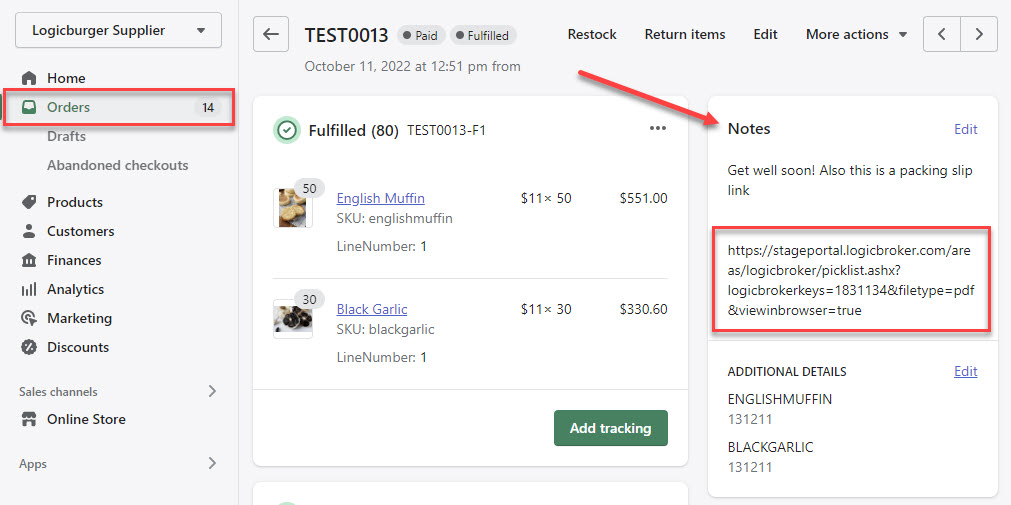
| ExtendedAttribute["ShopifyNote"] | note-attributes |
| ExtendedAttribute["ShopifyTags"] | tags |
| ExtendedAttribute[" ShopifyVendor"] | vendor |
| Note |
note |
| ⚠️ This field can be used for gift messages, packing slip links, etc. | |
| TaxTitle | tax-line.title |
| TaxAmount | tax-line.price |
| DiscountCode | discount-code.code |
| DiscountAmount | discount-code.amount |
| DiscountName | discount-code.type |
| Shipping Information | |
|
ShipmentInfo.CarrierCode |
shipping-line.carrier_identifier |
| ShipmentInfo.ClassCode | shipping-line.title |
|
ShipmentInfo.ServiceLevelCode |
shipping-line.requested_ fulfillment_service_id |
|
ShipmentInfo.ExtendedAttribute ["discounted_price"] |
shipping-line.discounted-price |
|
ShipmentInfo.ExtendedAttribute ["price"] |
shipping-line.price |
|
Order Lines |
|
|
Order Lines (OrderLines) |
line-items |
|
ItemIdentifier.SupplierSKU |
sku |
|
ItemIdentifier.PartnerSKU |
id |
|
LineNumber |
Index + 1 |
|
Description |
title |
|
Quantity |
quantity |
|
Price |
price |
|
Weight |
grams |
|
Discounts.DiscountAmount |
discount-allocations.amount |
|
ExtendedAttribute["ShopifyItemID"] |
id |
| Logicbroker API Field | Shopify Field |
|---|---|
|
ShipmentContainer |
fulfillment |
|
WareshouseCode |
location-id |
|
ExtendedAttribute ["ShopifyNotifyCustomer"] |
notify-customer |
|
CarrierCode |
tracking-company |
|
TrackingNumber |
tracking-number |
| ⚠️ A tracking number is required to pull in shipments/fulfillments from Shopify. | |
|
ShippingLine.ExtendedAttribute ["ShopifyItemID"] |
line-items.id |
|
ShippingLine.Quantity |
line-items.quantity |
- Logicbroker account (supplier flow) - become a Logicbroker customer
- Shopify account - review pricing, or try it for free!
Shopify Bundles
- Shopify App: Shopify Bundles
- How it works: Retailers can create "bundles" using the Shopify Bundles app that customers can add to cart and purchase. When the order is created, the "bundle" gets split out into individual lines with the bundle price prorated across the lines. When Logicbroker pulls orders containing bundles, we will create POs for the individual lines and send it to the suppliers to fulfill those lines.
| Issue | How to troubleshoot or resolve |
|---|---|
| Business rule failed > SupplierName_WF: TypeError: Cannot read property 'forEach' of undefined at Script Document [377]:4:19 doc.ShipmentInfos.forEach(function(info)) |
The order is missing information such as customer shipping info or shipping method. These fields need to be populated or added to the order in the portal. |
| Failed Order > - Error posting order to Shopify API. > API Error 422: {"errors":{"order":["Shipping lines is invalid"],"shipping_lines":[" Title can't be blank"]}} |
Reach out to support@logicbroker.com. Internal setup may be missing info.ClassCode field setup |
|
Error posting order to Shopify API > API Error 422: {"errors":{"line_items":["Unable to reserve inventory"]}}. |
This normally happens when the SKU on the order is out of stock in your Shopify account. Make sure you have enough quantity to fulfill the order in Shopify, then click on More Actions > Retry in Logicbroker to resend the order |
|
Orders not routing to the correct location |
Logicbroker follows all order routing rules set up in Shopify. Make sure you have these set up according in Shopify > Settings > Shipping and delivery > Order routing |
FAQ’s
What is the difference between Shipments and Fulfillments?
Shipments – shipping label is created in Shopify
Fulfillments – tracking is manually input into Shopify
Can I have Customer Contact Information sent on orders?
Yes. Logicbroker does not send customer data into Shopify since the Shopify Customer Number is unique and would not exist in both your's and your retailer's Shopify accounts. Sending the retailer's Shopify Customer Number on orders sent to your system will cause orders to fail.
If you need Customer Information populated in Shopify, we can hard-code this field. To do so, go to Shopify > Customers > Add customer > create the profile of the customer you want to be defaulted (you can use your partner's information). Copy the Shopify Customer Number (found in the last segment of the URL) and send it to support@logicbroker.com and ask this field to be hardcoded. 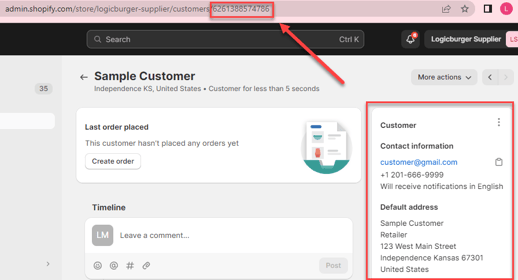
Can I have orders sent to me in a different payment status?
Yes, Logicbroker supports different payment statuses:
- Status: Paid; Paid amount: $0 (default)
- Status: Paid; Paid amount: order total amount
- Status: Pending; Paid amount: $0
If you need a different Status and Paid amount sent aside from the default, reach out to support@logicbroker.com to have this set up.
What should I do if I have duplicate SKUs?
Supplier SKUs must be unique for products that are being sent to the retailer. If products are not unique, suppliers must fix duplicates on both the product and variant level. A workaround can be implemented if suppliers have duplicate SKUs for identical products (not different sizes, colors, styles, etc.) since our workaround will create orders using the latest uploaded product in our system. If you would like a workaround to be implemented to your account for identical products with duplicate SKUs, reach out to support@logicbroker.com to have this set up.
Also see Shopify's Help page.
| Date | Update |
|---|---|
| 11/27/19 |
Add ability to Poll for Orders Post inventory (quantity) updates |
| 12/27/2019 | Create orders specifying the customer ID |
| 3/31/2020 | Updated error message when posting unlinked shipments to Shopify |
| 4/30/2020 |
Add mapping for ClassCode, ShipmentCost, ServiceLevelDescription on Orders to Shopify Map Variant ID to UPC on outbound shipments from Shopify |
| 7/13/2020 |
Supplier: Shipments map "province_code" from state Retailer: Update Order Map to include:
Retailer: Make financial status configurable when pulling orders |
| 8/31/2020 |
Add customer address and email Map tracking_company to class code for shipments GDPR endpoint to receive notifications for GDPR requests Do not pull shipments without tracking numbers |
| 11/10/2020 |
Ship to and bill to phone added to Supplier orders Inventory quantity will be updated based on location |
| 11/30/2020 | Location ID is now visible in the Portal through the Connections feature |
| 2/1/2021 | Customers can be notified when orders (placed through API) are shipped |
| 4/6/2021 |
Supplier: Shopify tags to order on the header level Supplier: UPC added to inventory map from barcode |
| 6/1/2021 |
Supplier: Ship to email added to the order map |
| 6/28/2021 |
Weight and UOM displayed on orders - acceptable UOM is grams Link to packing slips are accessible in the note field when posted to Shopify |
| 7/28/2021 |
Support for custom fields to add additional details to the order |
| 10/27/2021 |
Support to configure an order remorse period |
| 2/9/2022 |
Map fulfillment service on inbound orders |
| 6/22/2023 |
Stop pulling in products in a Draft and Archived status |