
General
Not receiving emails from Logicbroker?
Check your junk mail folder and add do-not-reply@logicbroker.com to your contacts list. If your company filters email, ask your IT team to allow messages from do-not-reply@logicbroker.com. If you are still not receiving emails from us, reach out to support@logicbroker.com and let us know your account name and your email and we'll look into the issue.
Can Logicbroker reject orders that have a shipping method I do not support?
No, Logicbroker cannot reject or block orders depending on the ship method. The supplier and retailer need to discuss which ship methods are accepted between the two outside of Logicbroker.
The retailer must be sure to comply and only send orders with ship methods the supplier can support. The supplier must be sure to only ship orders using the requested ship method.
Logging in and access
My invitation expired or never arrived
Who this applies to: new portal users at a supplier or retailer company.
What it means: you can only register from the link in your invitation email. The login page does not create new accounts.
What to check:
- Search your inbox and junk folder for an email titled "Welcome to Logicbroker!" from do-not-reply@logicbroker.com. If your company filters email, ask your IT team to allow that address.
- If you have used Logicbroker before, you may already have a username. Try to log in, or use Forgot Password on the login page.
- If you are onboarding with a retailer, the person who submitted the onboarding form receives the first invitation. Ask them whether they have registered.
How to get a new invitation:
- A teammate can send it. Anyone at your company with permission to manage users goes to My Profile > Manage Users, enters your Email under Invite New User and clicks Send Invite. The portal confirms "Sent invitation email to" your address. See How do I add a user? below.
- If your teammate sees "Failed to send invitation to" your address and was only just given permission to manage users, they log out, log back in and send it again.
- Nobody at your company has access yet. Email support@logicbroker.com with your company name, your retailer and the email address to invite. Support sends the invitation.
How to check it worked: open the new invitation, accept it and create your username and password. You can then log in with that username.
When to contact Support: if you accepted the invitation and still cannot log in, email support@logicbroker.com with your company name, your email address and a screenshot of the error.
How do I add a user?
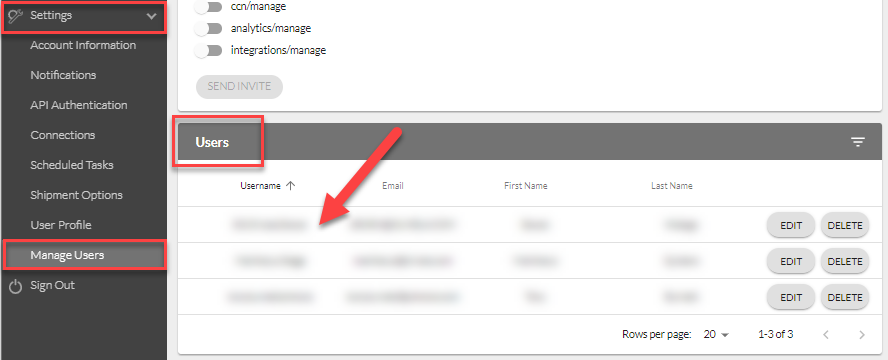
If you have permission to manage users, go to My Profile > Manage Users, enter their Email under Invite New User, choose their permissions and click Send Invite. They will receive an email invitation to register. See Manage Users.
Only users with permission to manage users see Edit and Delete next to each user on that page. If you don't, ask a teammate who does, or reach out to support@logicbroker.com.
I cannot log in: "Invalid username or password"
Who this applies to: any supplier or retailer user who logs in to the portal.
What it means: the login page did not accept the username and password you entered. Often the username is different from your email address. Sometimes there is no login for your email address at all.
What to check:
- Enter your username, not your email address, unless you registered with your email address as your username. Usernames and passwords are case-sensitive.
- If you forgot your username, use the forgot username option on the login page. You can also ask someone on your team who can manage users to look you up in My Profile > Manage Users. The list shows each person's username. You can also ask support@logicbroker.com with your company name and email address.
- If you forgot your password, click Forgot? next to the password field on the login page. Logicbroker sends you a reset email.
The fix depends on what you see:
- "Invalid or expired security code." Every click on Forgot? sends a new code. Click it once, wait for the email and use the code from the newest email only.
- The reset email never arrives. Check your junk folder and your email filters, as described in Not receiving emails from Logicbroker? above. If it still does not arrive, your email address may have no login. Your login may use a different email address, or you may never have registered. Email support@logicbroker.com with the email address you tried. Support looks up your login and, if you have none, sends you an invitation to register.
- The reset worked but the new password is still rejected. Check that you are entering your username, not your email address. If it still fails, email support@logicbroker.com. Support can confirm your username, or remove your user and send a new invitation so you can register again.
How to check it worked: after you enter your username and password, the portal asks for your verification code. See My verification code never arrives below if it does not come.
When to contact Support: email support@logicbroker.com with your company name, the retailer you work with, the email address and username you tried, a screenshot of the error and what you already tried.
My verification code never arrives
Who this applies to: any portal user who logs in.
What it means: after you enter your username and password, Logicbroker sends a verification code by email, text message or phone call. Email filters often hold or block the code.
What to check:
- Check your junk folder. The code comes from do-not-reply@logicbroker.com.
- Request the code again and choose a different option: email, text message or phone call. Text messages and phone calls need a phone number on your login.
- Clear your browser's cache and request the code again.
Who can fix it:
- Your IT team, if your company filters email. Ask them to allow messages from do-not-reply@logicbroker.com.
- Support, if you need a mobile number added to your login for text messages. Email support@logicbroker.com with your username and the mobile number.
- A teammate who manages users cannot change your phone number or send you a code.
How to check it worked: the code arrives, you enter it and the portal opens.
When to contact Support: if no option delivers a code, email support@logicbroker.com with your username, your company name, the options you tried and a screenshot of what you see.
I cannot access another company account
Who this applies to: people who work on more than one supplier account, for example two brands, or a service provider working on a supplier's behalf.
What it means: your login only opens the companies it has access to. When it has more than one, the company menu at the top of the portal shows Select company... and lists them.
An invitation from another company does not add that company to a login you already have. If the invitation page says someone "invited you to create a Logicbroker account but you already have one", do not register again. Keep using your existing username and ask Support to add the company.
What to check:
- Log out with the sign-out button at the bottom of the menu, then log back in. Access changes take effect after you log in again.
- Open the company menu at the top of the portal. If it shows only your company name and no list, your login has access to one company.
- If the other company is not on Logicbroker yet, its retailer needs to invite it first. Ask the retailer.
The fix: Support adds companies to an existing login. You, or an admin at your company, email support@logicbroker.com with:
- your username and the email address on your login;
- the name of each company you need, and its account number if you have it;
- the retailer you work with.
Some companies have more than one account in Logicbroker, so the account number helps Support pick the right one. A user at that company finds it in My Profile > Account Information, under Account Number. Support gives access to the supplier account you work on. You do not need access to the retailer's account.
If the person has no login yet, Support first sends them an invitation. After they register, Support adds the other companies.
A teammate who manages users cannot do this for you. If they open your user in Manage Users and see "This user has Group Access across other companies so their permissions cannot be edited.", Support must change your permissions too.
How to check it worked: after Support confirms, log out and back in. The company menu lists each company, and the portal switches when you select one.
Trying to log in but your company is not enabled in production?
Depending on where you are in your onboarding process, your company may or may not be enabled yet - when trying to login to the production portal, you will see this message: "It looks like your company is not enabled in production". Once you have completed the onboarding process, Logicbroker will push your account into production. If your account has not been enabled reach out to support@logicbroker.com and let us know your account name and your partner and we'll enable your account in production.
Inventory
Why are leading zeroes being deleted from my feed?
*Only applicable to suppliers manually uploading inventory to Logicbroker using Excel/CSV
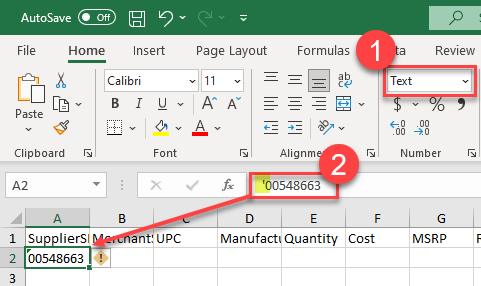
If you have information with leading zeroes, Excel will automatically remove them. To fix this, you can either:
- Change the column to Text format instead of General or Number format, or
- Add an apostrophe to the beginning of your input (ex. '00548663) - this will keep all your formatting in place
Why are my items showing up in scientific notation?
*Only applicable to suppliers manually uploading inventory to Logicbroker using Excel/CSV
SKUs and UPCs are often reverted to scientific notation due to their long number sequence. To fix this, you can change the column that shows up in scientific notation to Text format instead of General or Number format.
I sent my 846 but it is not showing up in stage portal?
*Only applicable to EDI suppliers
Make sure you are using the correct stage/test AS2 Identifier: STAGELOGICBROKERAS2, confirm you have our AS2 Information set up correctly and that your EDI connection is working.
Testing
I am an EDI supplier, can I cancel orders through the portal?
*Only applicable to EDI suppliers
Yes, if you plan on only canceling orders manually through the portal, you can process test cases that require a cancellation through the portal instead of sending an 855.
How do I know if testing is complete?
*Only applicable to suppliers working with a Logicbroker retailer
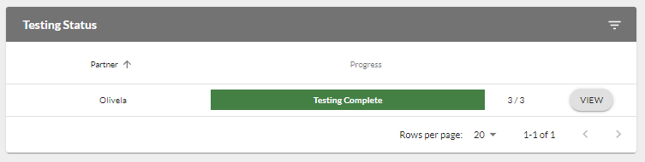
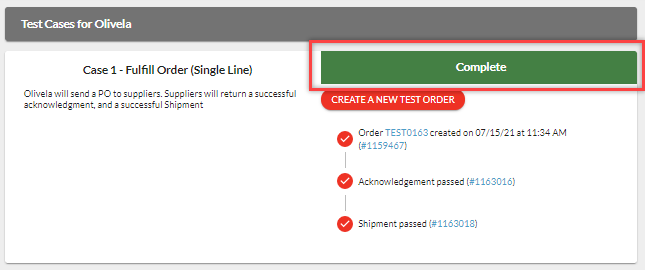
In stage portal, navigate to Testing > select your Partner > the bar should appear green and if you click View, all test cases should say Complete
We're updating this article. Some steps and screenshots may not match the portal yet. If anything is unclear, contact support@logicbroker.com.